

Top 20 Best Digital Marketing Tools 2022
The Top 20+ Essential Digital Marketing Tools Every Marketer Needs In 2022

Brands need to have a solid presence online in order to earn a great return on their investments.
Whether you are a small brand owner or a digital marketer hired by a brand, you need tools to make sure your business remains relevant to your customers.
The best tools for digital marketers moving into 2022 are touched upon below.
Table of contents:
- Best Advertising Tools And Platforms
- Best Digital Marketing Analytics Tools
- Best Tag Managers
- Business Analytics Platforms and Dashboards
- Keyword Research Tools
- SEO and Webmaster Tools
- Design Tools
- Website Hosting
- Video hosting
- Video Creation
- Landing Pages
- Website Speed Testing Tools
- Project Management Tools
- Survey Tools
- Email Tools
- Click Fraud Protection
- Link Management
- Social media management
- Best digital marketing automation tools
1. Best Advertising Tools And Platforms
Google and Facebook still reign supreme

1.1. Google Ads

When thinking about PPC advertising, the first thing that comes to mind to most advertisers is Google Ads.
Today, Google processes more than 40,000 search queries per second, more than 3 billion per day, and more than one trillion per year. And this growth started strong and no sign of stopping since the beginning of 2000.
With Google Ads (Formerly AdWords) you can reach new customers and grow your business across Google’s most advanced online advertising platforms, such as:
- Google Search Network,
- Google Display Network,
- Google Discovery Ads,
- YouTube Video Ads,
- Google App Campaigns.
Get in front of customers when they’re searching for businesses like yours on Google Search and Maps. Only pay for results, like clicks to your website or calls to your business.
1.2. Facebook Ads

Why is Facebook Ads so popular among advertisers and business owners?
Owning a huge amount of user data, it is not surprising that it accounted for 25% of the world’s total online advertising budget last year.
1.3. Taboola

Taboola stands out from other advertising solutions, as it is a platform for native advertising. If you’re unfamiliar with native ads, it’s a chance for someone else to advertise content on their blog. The ad format appears as content on the hosting website.
Recently, Taboola confirmed Outbrain with a merger and created a superpower of a digital ad tool that helps you reach the right people, achieve more visibility, and deliver reporting that will allow you to customize your strategy.
If you’re looking for some free options available to help your business grow check out our latest article – Top 20 Best Free Advertising Websites For Businesses In 2022.
Also, learn more about 15 Best Free Advertising Sites for Business Owners & Marketers.
2. Best Digital Marketing Analytics Tools
Google Analytics

As this is owned by Google, it is one of the most popular business intelligence tools you can find. It provides you with great insight into visitations to your e-commerce website or mobile app.
Most popular traffic analysis tool
According to W3 tech, Google Analytics is used by 55.4% of all the websites, that is a traffic analysis tool market share of 85.1%!
| Pros | Cons |
| It is free to use | The learning curve is a bit steep. |
| Most popular traffic analysis tool | Users will have to source training on their own as Google doesn’t provide great support for it. |
Similarweb
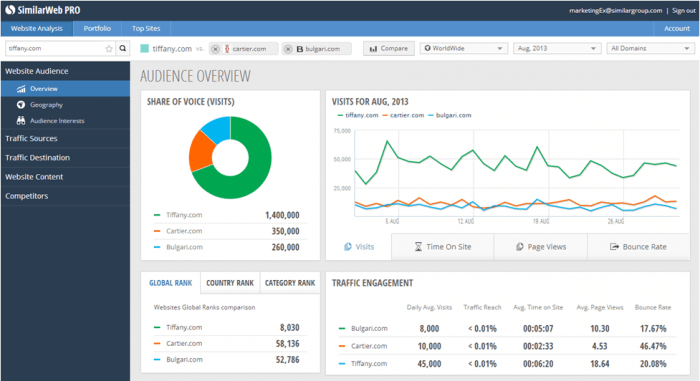
This digital marketing intelligence tool will help you with a detailed analysis of the performance of your website in comparison with those of your competitors.
You get a 7-day period to test it out for free. The pricing starts from $249 monthly.
| Pros | Cons |
| It helps you gain detailed information on your consumers and competitors websites. | It does not measure your mobile app traffic. |
| 7-day Free Trial | Quite expensive |
MixPanel

Mixpanel helps you with an analysis of user engagements across your various web platforms.
This will then enable you to make decisions that will help your business grow.
Mixpanel offers a free version that allows you to track 100,000 users monthly.
You’ll need a subscription starting from $17 monthly to track more users.
| Pros | Cons |
| It is very easy to use. | There have been reports of instability while using this tool. |
| It has a robust free version. |
Hotjar

Hotjar helps you get real value across to your customers. It allows you to understand how visitors interact with your website.
| Pros | Cons |
| It has a user-friendly interface | Heat maps can be difficult to interpret |
| It is not as expensive as other tools on this list | Heat maps could also violate the users’ privacy |
3. Best Tag Managers
Google Tag Manager
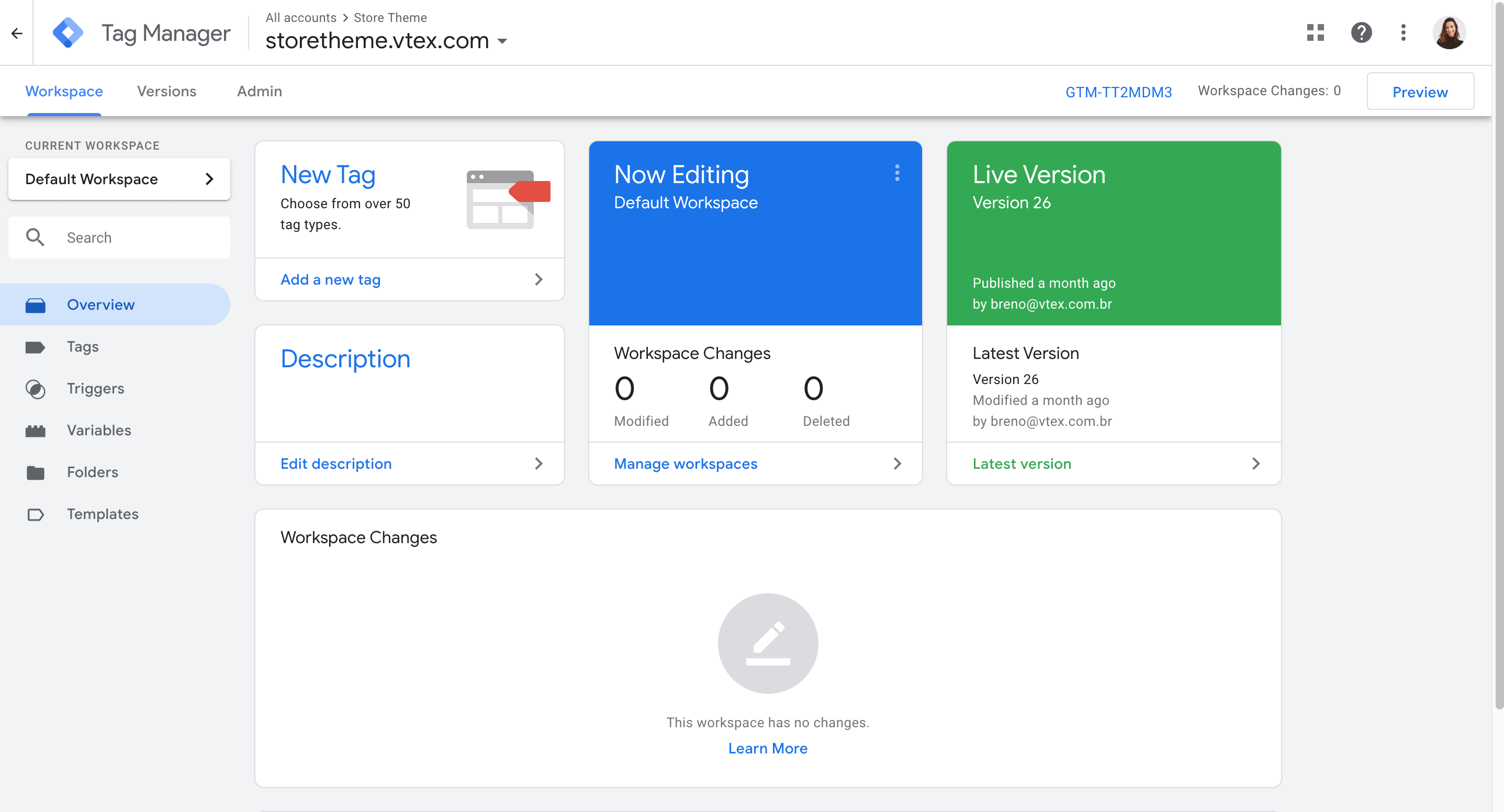
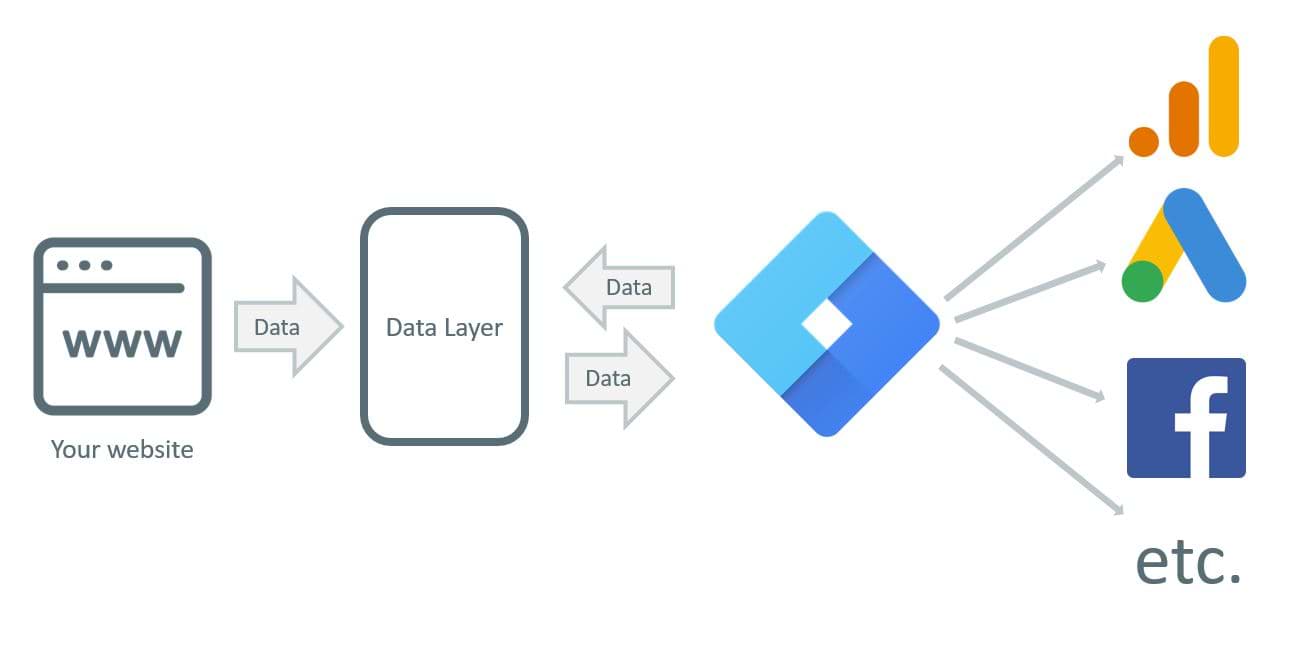
This tool helps you check for errors and loopholes in security to ensure that all your tags work perfectly. It helps improve your efficiency by granting you access to all your programs swiftly.
| Pros | Cons |
| It works with almost any platform | Can be difficult to get used to. |
| It is free to use |
Tag Commander
This is a tag management with triggered-based tools that gives marketers the ability to manage and deploy their tags, and harvest the data collected from websites, without support from their IT teams.
| Pros | Cons |
| Parameters can be easily defined. | The support system could be not very responsive. |
4. Business Analytics Platforms and Dashboards
Data Studio

Google data studio gives you a way to represent data analysis reports as beautiful visuals. Google data studio is available to use for free.
| Pros | Cons |
| It allows you to input data from multiple sources | It may a bit overwhelming for new users |
Supermetrics

With Supermetrics, you can create customized reports pulling all the metrics and dimensions from most popular marketing platforms, such as:
- Google Analytics
- Google AdSense
- Google Ads manager
- Google Data Studio
- Google Search Console
- Google Trends
- Facebook Ads Manager
- LinkedIn Ads
- Mailchimp
- Twitter Ads
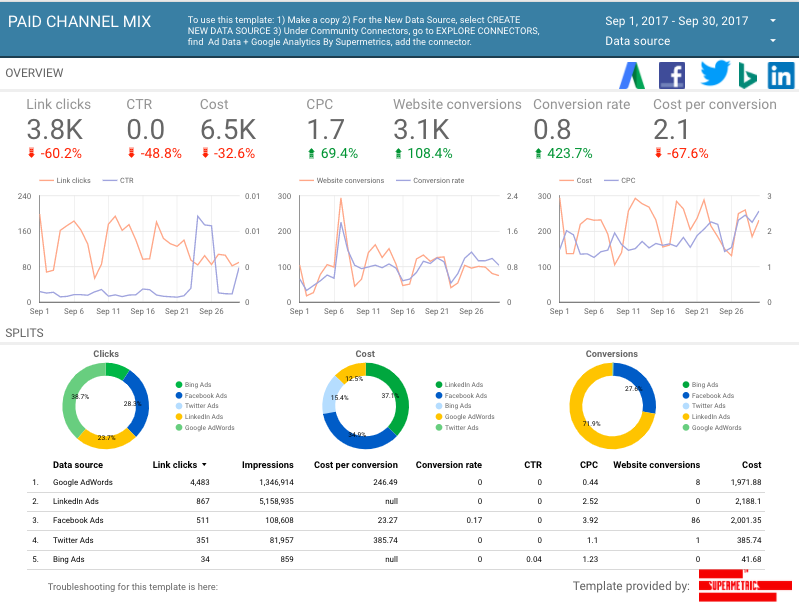
The tool is available starting from €69.
| Pros | Cons |
| There are a lot of connectors available to use with Supermetrics | Some users have reported that it can sometimes be slow and glitchy |
Databox

This tool helps you monitor all your data in one location as well as check out the progression of your goals. Pricing for this tool starts at $49 per month.
| Pros | Cons |
| It has a user-friendly and easy-to-use interface. | It has limited report customizations. |
Klipfolio

This is a business intelligence platform that helps you make better business decisions based on analytics. It is available starting from $99 per month.
| Pros | Cons |
| The layout is intuitive and visually appealing. | It has a data source limit of just 10 megabytes. |
5. Keyword Research Tools
Google Trends

Google trends helps you find out the popularity of keywords by the search volume. Google Trends is a completely free tool.
| Pros | Cons |
| Trends is completely free to use. | It does not provide exact numbers but rather approximations. |
Google Planner
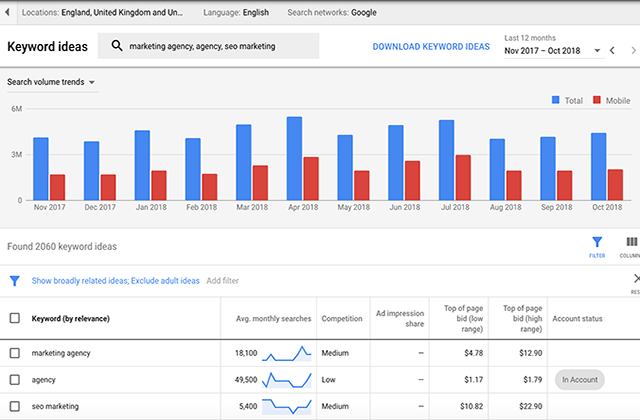
Google keyword planner helps you find the right keywords for your business. Google keyword planner is free to use.
| Pros | Cons |
| You do not have to pay to use it | You can’t see the exact number of monthly searches for specific keywords unless you run an active campaign on Google Ads |
Surferseo.com

This is a free Chrome extension that enables you to research keywords.

SurfSEO allow you to identify and analyze a relevant list of long-tail search terms for your content strategy.
| Pros | Cons |
| It gives users a secondary keywords list | It is not as powerful as some paid alternatives. |
KWFinder

KWFinder allows you to do keyword research for both paid and SEO search. It is available from $49 per month for the basic tier.
| Pros | Cons |
| It helps you discover your competitors’ usage of keywords. | The value it offers may not be worth it for some. |
Keyword.io

This tool helps you find the right keywords for your business content in order to bring the right people to your website. You can get this tool starting from $29 per month.
| Pros | Cons |
| It is extremely fast. | A lot of functionality is hidden behind the pro version. |
Ubersuggest

This SEO tool helps you identify keywords that generate the most traffic so your business can stay ahead of the others. Pricing for this tool starts at $29 per month, but it also has a Free version. There is also the option for a one-time payment.
| Pros | Cons |
| It offers you the option to pay for lifetime use. | Platform has some limitations in competitors’ analysis. |
6. SEO and Webmaster Tools

SEMrush
SEMrush is an excellent all-in-one SEO marketing tool.

Semrush helps marketers and publishers optimize their websites for search engines like Google, Bing, and Yahoo.
SEMrush covers website SEO, content creation, keyword research, PPC advertising, competitors’ position analysis, and social media.
So it will be helpful if you want to:
- Discover errors, issues, and general website health
- Analyze your competitors’ PPC keywords for which they’re bidding
- Undertand your website’s backlinks situation
- Check the users’ keywords intent (recently added feature)
- Discover new keyword ideas your website could rank higher
The SEMrush base tier costs $119.95 per month and it also has a 7-day Free Trial.
| Pros | Cons |
| Although it has several functions, everything is laid out intuitively. | It only provides metrics for Google search engine |
MOZ

MOZ helps you keep your website near the top of the page when people search for what your business offers. MOZ costs $99 per month for the standard package.
| Pros | Cons |
| It provides ranking data on not only Google but also Bing and Yahoo searches. | It is not as user-friendly as its alternatives |
Ahrefs

Ahrefs helps your website rank higher even if you are not a SEO expert. The lite version is available for $99 per month.
| Pros | Cons |
| It works with a large number of search engines. | Although it provides great SEO data, it is not as strong in PPC. |
Screaming Frog SEO

This is a great tool for website auditing. It helps you improve your onsite SEO. It can be used for free but advanced features are locked behind a £149 yearly subscription.

| Pros | Cons |
| It has a lot of options and lets you scan all the pages on a site. | It runs into difficulties when scanning large sites |
Google Search Console

This is a great tool that helps you track and manage the performance of your website as well as detect issues. It is a free-to-use tool.
| Pros | Cons |
| It is free to use and can be set up easily. | Some of the features work well only with other Google tools. |
Bing Webmasters

Bing webmasters brings great tools to help ensure that your website has a solid presence on Bing search engine.
| Pros | Cons |
| It is free to use | The user interface is oversimplified and boring |
| You can import data from Google search console easily |
7. Design Tools
Canva

Canva is a great tool for creating social media graphic content for businesses. A Canva subscription costs $12.95 per month for pro users and $30 per month for each user for enterprises.
| Pros | Cons |
| Provides you with great templates and images for your content creatives | It has many limitation for PRO users. |
Vista
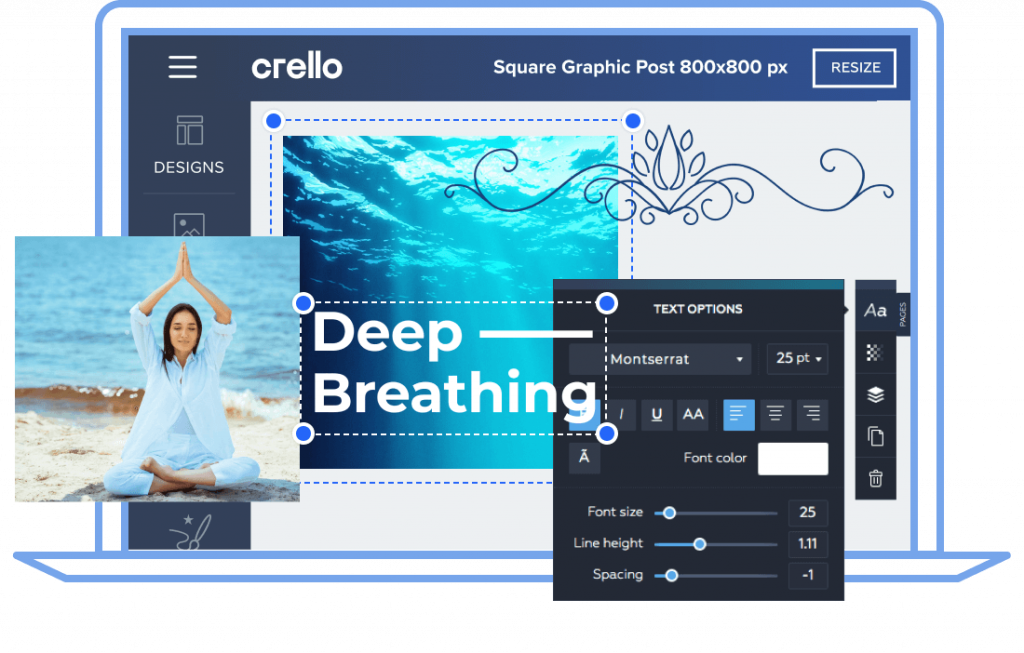
Formerly Crello, this graphic design tool offers you thousands of templates to create great content for social media. Pricing for this tool starts at $10 per month.
| Pros | Cons |
| It has a lot of templates so you do not have to be creative to use it. | You are unable to curve text or create bullets. |
8. Website Hosting
A2 Hosting

This is a web hosting service that promises up to 20 times faster load time for your websites than other competitors. A2 hosting offers web hosting services starting from $2.99 per month.
| Pros | Cons |
| Migrating your site to a2 is very easy. | Domain names can be quite expensive. |
| Very good and quick support | – |
| Perfect for Wordpress websites | – |
Hostinger

Hostinger promises fast and secure web hosting services to help you take the internet by storm. Pricing starts at $1.39 per month.
| Pros | Cons |
| Cheap price and great support. | Limited disk space. |
Bluehost

Bluehost provides you with tools to create and maintain your website regardless of your skill level. Pricing starts at $3.95 per month
| Pros | Cons |
| Bluehost is very easy to use with WordPress and WP is pre-installed by default | It might take a while for new users to understand it. |
DreamHost

Dreamhost provides excellent web hosting services for your website. Pricing for Dreamhost starts at $7.95.
| Pros | Cons |
| Amazing customer service. | Integration with external services could be better. |
9. Video hosting
Wistia

Wistia is a video hosting platform that helps you captivate viewers with videos on your site. Wistia video marketing software is available from $99 per month.
| Pros | Cons |
| It offers powerful tools and a beautiful user interface. | It offers limited value to small businesses |
Vimeo

This is an online video hosting platform that allows you to create and share video content for your organization. Vimeo pricing starts at $12 per month.
| Pros | Cons |
| Vimeo is ad-free and is easy to use. | It may not be suitable for larger organizations. |
10. Video Creation
InVideo

This is a light video editing tool that enables you to create simple video content on the fly. Invideo has a free version but premium starts from $30 monthly.
| Pros | Cons |
| It is great for editing videos quickly. | Video length is limited to 15 minutes. |
11. Landing Pages
WordPress

WordPress is an open-source publishing platform that allows you to create and customize your website. Pricing for WordPress starts at $4 per month.
| Pros | Cons |
| User-friendly CMS | Requires knowledge and time to create a website or a landing page on your own |
| It has an organized and easy-to-navigate dashboard. | You could run into some problems with plugins. |
| Very simplified content creation | No dedicated support. |
| Highly flexible CMS with huge and supportive community | Customizing can be expensive |
Unbounce

Unbounce helps you create already optimized landing pages for your website within minutes. Pricing for Us starts at $79 per month.
| Pros | Cons |
| It uses AI to help you generate content. | More templates would be a welcome addition. |
Instapage

Instapage is a platform that helps you build your website landing page with a high conversion rate. It is available starting from $199 per month.
| Pros | Cons |
| Instapage is great for integration and high conversions. | The pricing could be better. |
Wix

This web development platform enables you to build and optimize your website for great performance.
| Pros | Cons |
| You can easily duplicate web pages so you do not have to start over all the time. | You can only have a single owner for your website. |
12. Website Speed Testing Tools
Google PageSpeed Insights

This helps you optimize your website based on how much speed content takes to load. Google PageSpeed Insights is available free of charge.
| Pros | Cons |
| It shows separate results for the desktop and mobile versions of your website. | Newbies may experience some difficulty using it. |
Pingdom

Solarwinds Pingdom helps you to monitor your website’s uptime and performance. Pricing starts from $42.12 per month.
| Pros | Cons |
| It is easy to set up and integrate. | The user interface is a bit clunky. |
Gtmetrix

Gtmetrix enables you to test the performance and speed of your website from different locations in the world. It is available starting from $160 per month.
| Pros | Cons |
| It lets you assess the health of your website quickly. | More test locations would be welcome. |
Webpagetest.org

This is a free, open-source page performance tool that helps you monitor the performance of your webpage from different locations.
13. Project Management Tools
Trello

Trello helps you manage projects with boards that can be shared across team members. Pricing starts at $12.50 per month.
| Pros | Cons |
| It helps you keep track of shared workloads among team members | Large projects tend to get messy. |
Asana

This is a project management tool for both web and mobile. It helps you keep track of work done among team members.
| Pros | Cons |
| It helps you keep track of and communicate about projects. | The templates may take a while to customize. |
| Very limited on free version |
14. Survey Tools
Google Forms

This tool helps you create forms and surveys.
| Pros | Cons |
| It is easy to use and forms created can be shared easily. | The style cannot be customized. |
Survey Anyplace

Survey Anyplace allows you to create surveys and quizzes in order to get feedback from customers on your product. It is available starting from $39 per month.
| Pros | Cons |
| You can easily generate a PDF report of your quizzes. | Editing questions can be quite difficult. |
SurveyMonkey

SurveyMonkey allows you to create free, customizable surveys and quizzes. It costs $27 per month to unlock advanced features.
| Pros | Cons |
| Reach on customization options. | You can only send reminders to groups and not individuals. |
Survicate

This tool can be integrated with your marketing automation platform to collect feedback from customers via surveys and questionnaires. It is available starting from $60 per month.
| Pros | Cons |
| Helps you understand your customers better. | It has limited integration with other tools. |
15. Email Tools
MailChimp

Mailchimp is an all-in-one business platform manager that helps you send emails, generate ads, etcetera. Pricing starts at $10 per month.
| Pros | Cons |
| It is extremely easy to use. | Limited autonomy over the design of emails. |
SendFox

This is a reliable email service for startups. Costs $50 for life-time activation.
| Pros | Cons |
| It does not need a monthly subscription. | Sendfox doesn’t allow you to add images to your emails. |
Active Campaign

This is a tool that bundles email marketing, marketing and sales automation, and customer relationship management in a single package. Pricing starts at $9 per month for 3 users.
| Pros | Cons |
| The automation is great. | You can’t automatically send emails to people who haven’t opened previous emails. |
Constant Contact

This is a bulk email marketing tool with built-in social media integration. Pricing starts at $20 monthly.
| Pros | Cons |
| It allows for easy contact management. | The user interface can be better. |
16. Click Fraud Protection
PPC Protect

This is a fraud prevention platform for digital media marketers. It is available for $70.
| Pros | Cons |
| Helps to ensure the legitimacy of clicks. | The UI is not exactly intuitive. |
ClickCease

This tool helps to prevent and protect your website against clickfraud. It is available starting from $50.
17. Link Management
Bitly

This tool is one of the most popular link shortening tools. It is available starting from $35 per month.
| Pros | Cons |
| It is extremely easy to figure out and use. | Links once created cannot be edited. |
18. Social media management
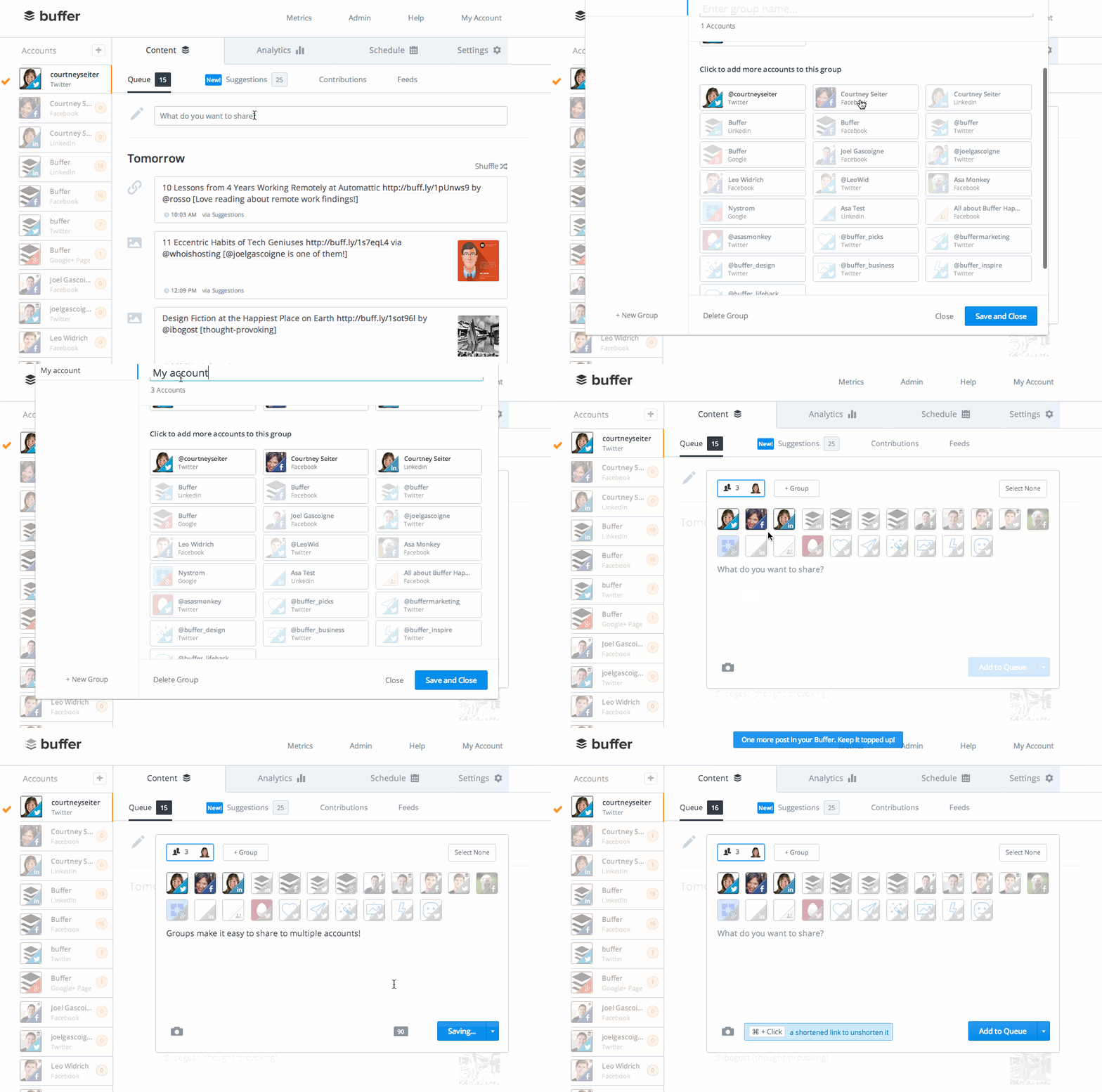
Buffer

Buffer is a all-in-one platform for social media managements. With Buffer you can share content to any of your social accounts and measure how well it performs.
Hootsuite

This tool helps you manage your streams and engagements from different social media platforms.

Key Features:
- Hootsuite supports all the leading social networks.
- You can manage all your social accounts and key metrics from a single dashboard.
- Hootsuite helps you to post and manage the content.
 Price/Package Price/Package |  Features Features |
| FREE | Limited features |
| STARTER | 5X contact tier email send limit Remove HubSpot branding |
| PROFESSIONAL | 10X contact tier email send limit per calendar month Remove HubSpot branding Additional features |
| ENTERPRISE | 20X contact tier email send limit per calendar month Remove HubSpot branding Additional features |
19. Best digital marketing automation tools
Integromat

Integromat allows you to link apps and add automation to manual tasks.

| Pros | Cons |
| It allows you to integrate with any API. | Poor documentation on linking Integromat with platforms. |
Automate.io

Automate.io allows you to integrate platforms without the need for any coding. Pricing starts from $49 monthly.

| Pros | Cons |
| It has great interaction with tool APIs. | Screens sometimes take a while to load. |
Conclusion
There is a countless number of tools out there for digital marketing. This list only compiles what we believe are the best in each segment of digital marketing.


