

Facebook Account Disabled? How to Appeal and Recover It (2026)

Quick answer: If Facebook disabled your account, you can appeal to Meta through the official “My Personal Account Was Disabled” form (facebook.com/help/contact/260749603972907) or in the app via Accounts Center → Account Status. Upload a clear photo of your government ID, explain your case briefly, and submit only once. In 2026, reviews take anywhere from a few days to several weeks (roughly 7–45 days depending on the method). One thing most people miss: you have about 180 days to appeal — after that, or after a denial, the account is usually permanently disabled, so act quickly.
Disabled, suspended, locked, or restricted? Know which one you have
Facebook uses these words differently, and each has its own recovery path — check the exact wording on your screen or in Account Status before you do anything:
- Locked — a temporary security hold, usually cleared with a quick identity or photo check.
- Restricted / suspended — limited features (often on Pages or ad accounts), frequently time-limited.
- Disabled — the account is fully shut down and needs a formal appeal (this guide).
- Disabled – ineligible — a special status covered in its own section below.
Why Facebook disables accounts
Knowing the likely trigger helps you write a stronger appeal:
- Community Standards violations — content flagged as spam, hate speech, harassment, nudity, or dangerous organizations.
- Suspicious or automated activity — bursts of friend requests, logins from many devices or countries, or bot-like behavior.
- Identity or authenticity issues — a name Facebook believes is fake, or a missed identity-confirmation deadline.
- Linked or multiple accounts — a new profile tied to a previously banned one.
- Ad-account or payment problems — for advertisers, policy or billing issues (a separate process — see below).
How to appeal a disabled Facebook account, step by step
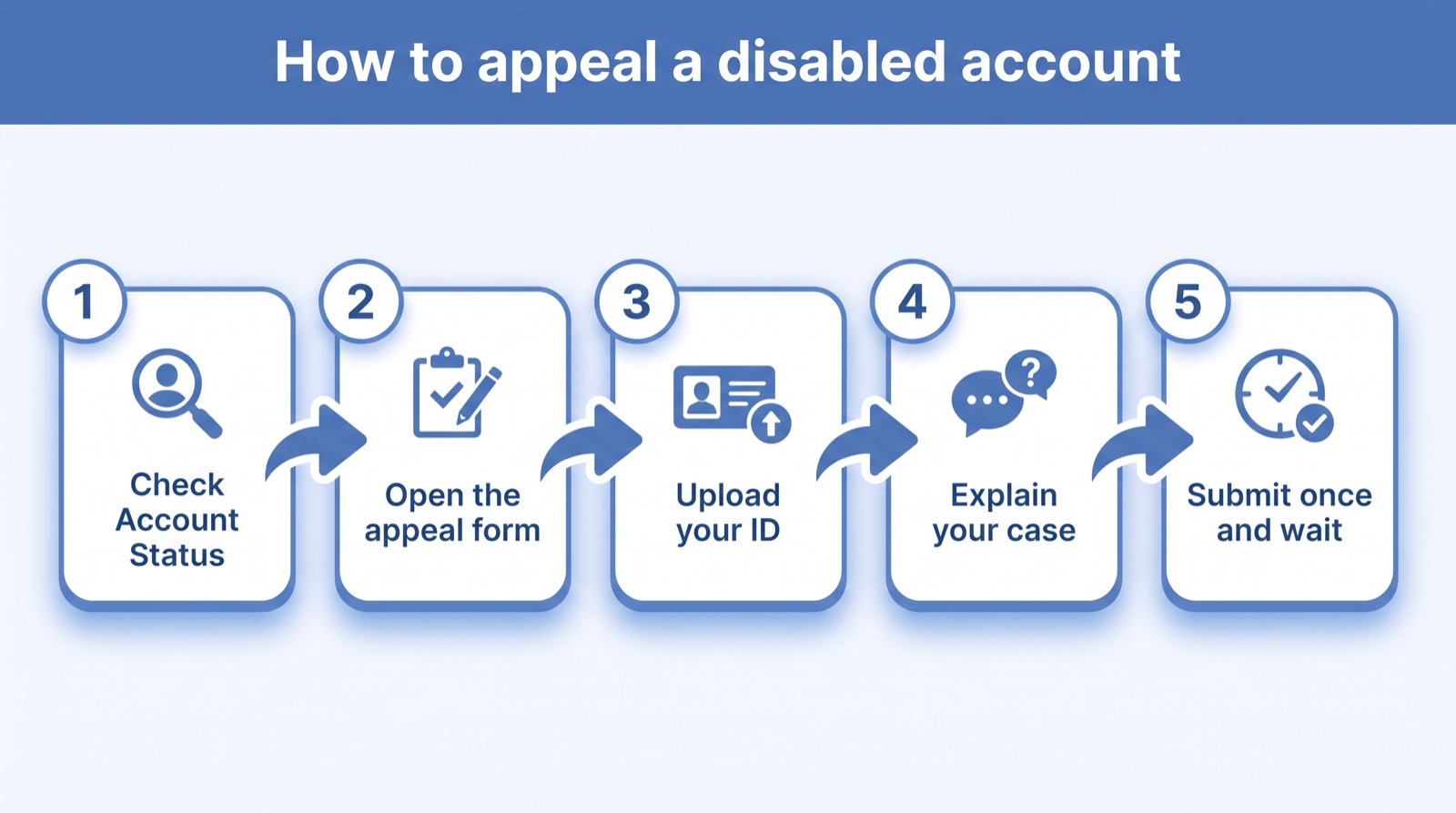
- Check your Account Status first. Open Account Status (Accounts Center → Account Status) to see whether a review is even available for your case.
- Open the official appeal form. Use Meta’s “My Personal Account Was Disabled” form — you don’t need to be logged in to submit it.
- Verify your identity. Upload a clear, full photo of a government-issued ID where your name and date of birth match your profile. Don’t crop or redact it, and never send your ID through random third-party services.
- Explain your case — briefly and politely. Two or three sentences (use the template below). Don’t argue, threaten, or write essays.
- Submit once and save your case ID. Sending multiple appeals with different details looks like spam and can hurt you.
- Watch your email — including the spam folder. Meta’s decision and any follow-up link go to the email on the account.
Facebook disabled account appeal form: official links (2026)
The main Facebook appeal form for a disabled account is the “My Personal Account Was Disabled” form at facebook.com/help/contact/260749603972907. Meta relocates these links often, so always confirm you’re on a facebook.com domain before entering anything:
- Personal account disabled:
facebook.com/help/contact/260749603972907 - Submit an appeal (general):
facebook.com/help/contact/269030579858086 - Disabled – ineligible:
facebook.com/help/contact/317389574998690 - Check Account Status:
facebook.com/help/1392616391875085 - Help hub: facebook.com/help/103873106370583
Copy-and-paste Facebook appeal letter (template)
Keep it short, calm, and specific. Fill in the blanks and match the name on your ID:
Hello,
I’m writing to appeal the disabling of my Facebook account (Name: ______; email/phone on the account: ______). I believe it may have been disabled by mistake.
I’ve always tried to follow Facebook’s Community Standards. If I unintentionally violated a policy, I sincerely apologize — it was never my intention. This account matters to me because it holds my personal connections, photos, and messages.
I’ve attached a photo of my government-issued ID for verification. I respectfully ask you to review my account and restore access when you can.
Thank you for your time and help.
Sincerely,
______
Do: stay under ~150 words, apologize once, be consistent. Don’t: demand, threaten legal action, or submit repeatedly.
Need more options? See our Facebook appeal letter templates for mistaken bans, policy violations, ID checks, and disabled ad accounts.
What “Disabled – Ineligible” means
If Facebook labels your account Disabled – Ineligible, its systems are questioning whether you’re allowed to use the platform and are asking for information to re-check your eligibility — usually after an alleged policy violation. Instead of the normal form, use the dedicated Disabled – Ineligible form and submit exactly the information requested, along with your ID. Only file it if your account was disabled for a policy issue.
Disabled ad account, Page, or Business Manager? Different process
If your advertising is blocked rather than your personal profile, use the ad-account flow instead — see our guide on how to appeal a disabled Facebook ad account. If you advertise seriously, a second Business Manager protects you from a single suspension, and it pays to learn the signals that get ad accounts flagged in the first place.
How long it takes, the 180-day deadline, and what if you’re rejected
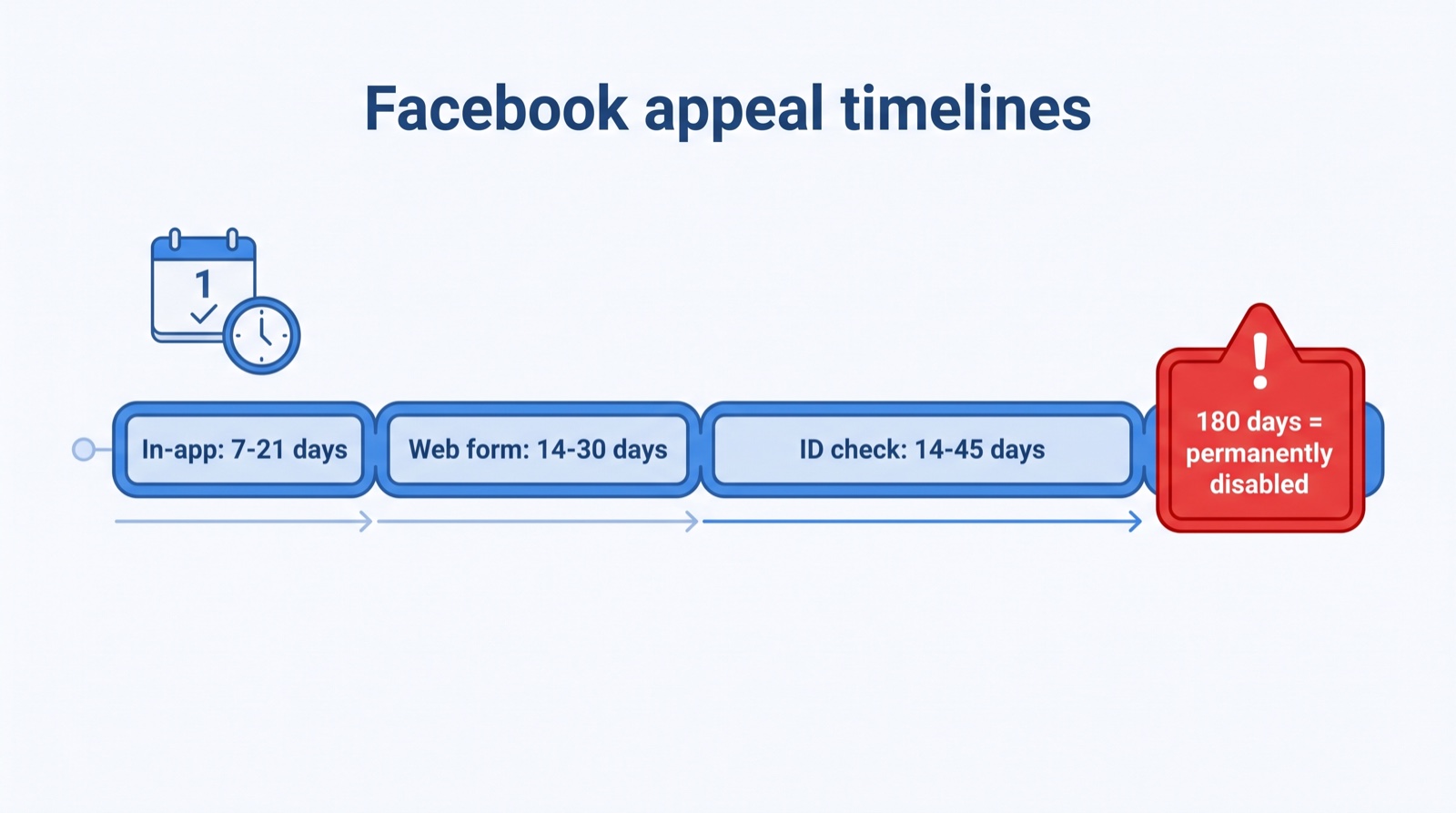
Typical 2026 review times: in-app appeals 7–21 days, web-form 14–30 days, and identity checks 14–45 days. Meta’s response times have become slower and less predictable, so be patient after submitting once.
The 180-day rule matters most: if you don’t appeal within about 180 days — or if your appeal is denied — the account is usually classified as permanently disabled, and you can no longer request a review. Recovery after that is rare, though re-appealing sometimes works for accounts disabled by automated systems in error. If you fear a permanent loss, download your information now while you can still access it.
If it was a single content decision rather than the whole account, you can escalate to the independent Oversight Board.
Good news if you win: when an appeal is approved, your account is restored exactly as it was — photos, posts, friends, groups, and messages intact.
How to avoid getting disabled again
Prevention beats appeals. Use one real identity, turn on two-factor authentication, avoid sudden bursts of activity, and don’t link a fresh profile to a banned one. Advertisers should keep billing clean, follow the ad policies, and use automated rules to catch problems early rather than pushing limits.
Frequently asked questions
How do I appeal a disabled Facebook account?
Check Account Status, then open Meta’s “My Personal Account Was Disabled” form (facebook.com/help/contact/260749603972907), upload a government ID, briefly explain your case, submit once, and watch your email for the decision.
What is the Facebook disabled-account appeal form URL?
The Facebook appeal form for a disabled account is facebook.com/help/contact/260749603972907 (“My Personal Account Was Disabled”). For the “Disabled – Ineligible” status, use facebook.com/help/contact/317389574998690.
Is there a Facebook appeal email for a disabled account?
There’s no official Facebook email for appealing a disabled personal account in 2026. Addresses that circulate online (like [email protected] or [email protected]) aren’t part of Facebook’s current appeal process and typically go unanswered. Appeal instead through Accounts Center → Account Status in the app or the official form (facebook.com/help/contact/260749603972907); Meta’s decision then arrives by email at the address on your account, so watch your inbox and spam folder.
How long does a Facebook account appeal take in 2026?
Usually a few days to several weeks — roughly 7–21 days in-app, 14–30 days by web form, and 14–45 days when identity verification is involved.
What does “Disabled – Ineligible” mean?
Facebook is questioning your eligibility to use the platform after an alleged violation and wants information to re-check it. Use the dedicated ineligible form and provide exactly what’s requested.
Can I recover a permanently disabled Facebook account?
It’s hard. After about 180 days disabled (or a denied appeal), accounts are usually permanent and can’t be reviewed again — though re-appealing occasionally reverses automated mistakes. Act within the 180-day window.
Will I lose my photos and messages?
No — if your appeal is approved, everything comes back exactly as before: photos, posts, friends, groups, and messages.
How do I appeal a disabled Facebook ad account?
Use the ad-account review flow in Ads Manager and Account Quality, not the personal form. See our disabled ad account appeal guide for the exact steps.
Related: Will AI get your Facebook ad account banned? Meta’s 2026 AI rules


> Prezada equipe da Meta,
Venho solicitar, com todo respeito, uma nova análise da desativação da minha conta do Facebook. Essa conta é muito importante para mim, pois a utilizo para manter contato com familiares, amigos e também para divulgar o meu trabalho missionário em Moçambique.
Se cometi alguma violação das Políticas da Comunidade, peço sinceras desculpas. Nunca tive a intenção de infringir as regras da plataforma. Caso tenha ocorrido algum erro ou mal-entendido, peço gentilmente que minha conta seja reavaliada.
Comprometo-me a seguir rigorosamente todas as Políticas da Comunidade da Meta daqui em diante.
Agradeço pela atenção e peço, por gentileza, que reconsiderem o meu caso.
Atenciosamente, Elias
> Prezada equipe da Meta,
Venho solicitar, com todo respeito, uma nova análise da desativação da minha conta do Facebook. Essa conta é muito importante para mim, pois a utilizo para manter contato com familiares, amigos e também para divulgar o meu trabalho missionário em Moçambique.
Se cometi alguma violação das Políticas da Comunidade, peço sinceras desculpas. Nunca tive a intenção de infringir as regras da plataforma. Caso tenha ocorrido algum erro ou mal-entendido, peço gentilmente que minha conta seja reavaliada.
Comprometo-me a seguir rigorosamente todas as Políticas da Comunidade da Meta daqui em diante.
Agradeço pela atenção e peço, por gentileza, que reconsiderem o meu caso.
Atenciosamente, Elias
Subject: Request to Restore My Facebook Account
Dear Facebook Support Team,
I respectfully request that you review and restore my Facebook account.
My account was disabled because the profile picture on my account is more than one year old. Since then, I have grown older, and my facial appearance has naturally changed. Because of this, I believe your verification system was unable to recognize me correctly.
I confirm that this is my genuine Facebook account, and I am the rightful owner. I kindly request that you manually review my account and restore my access as soon as possible.
Thank you for your time and consideration. I would greatly appreciate your help in reactivating my account.
Sincerely,
Rehan Baloch
Subject: Request for Review and Reactivation of My Facebook Account
Dear Facebook Support Team,
I respectfully request another review of my Facebook account.
My account was created using my real name, my personal Gmail address, and my real photos. I have always tried to follow Facebook’s Community Standards.
When requested, I successfully completed the selfie verification, and it was accepted. However, it has now been six days since I submitted my appeal, and I have not received any update by email or within my account.
If my account was suspended by mistake, I kindly ask you to review it again and restore access as soon as possible.
Thank you for your time and consideration.
Sincerely,
[Your Full Name]
I confirm that my Facebook account was disabled Base on integrity violations, please help me to restore my Facebook account for me to do better and share a good though that makes people happy, thank you for your help.